EVALUATING AI | Exercising Reason, Rigor, and Restraint
“AI” is now the most-discussed word in architecture, AND the least precise.
In a single meeting it might mean a foundation model, a rendering plugin, a subscription service, or a category of generative-design tools that predate the current AI boom by a decade. That imprecision is why so many firms struggle to evaluate AI-enabled technology with real discipline.
Before a firm can judge whether a tool is worth adopting, it has to know what kind of tool it’s looking at. This Brief lays out a framework for that approach, using generative planning, AI visualization, and AI-enabled production and office workflows as working case studies—not to crown winners, but to show how to think about them.
The argument: classify a technology correctly before evaluating it, and adopt
AI is Not a Product Category
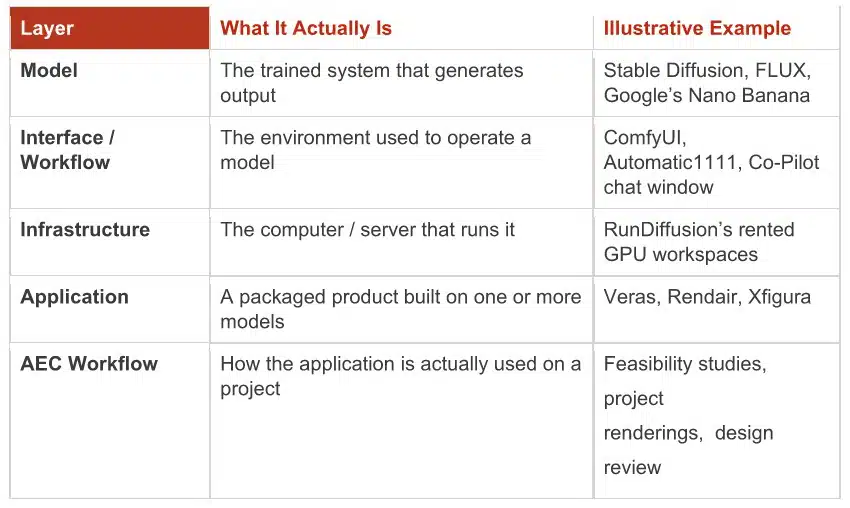 Comparing Run Diffusion to Flux to ComfyUI to Veras is comparing a rental-car company to an engine to a dashboard to a road trip. Each is real, but none substitutes for the others. A firm that shortlists RunDiffusion vs. Veras has compared infrastructure to an application—the criteria that matter for one (uptime, GPU cost) have nothing to do with the criteria for the other (geometry fidelity, plugin integration, output style).
Sorting a tool into its correct layer first separates an apples-to-engines comparison from a real one.
Capability is Not the Same as Application
Even within the application layer, AI describes capabilities that have almost nothing in common. It’s worth separating four:
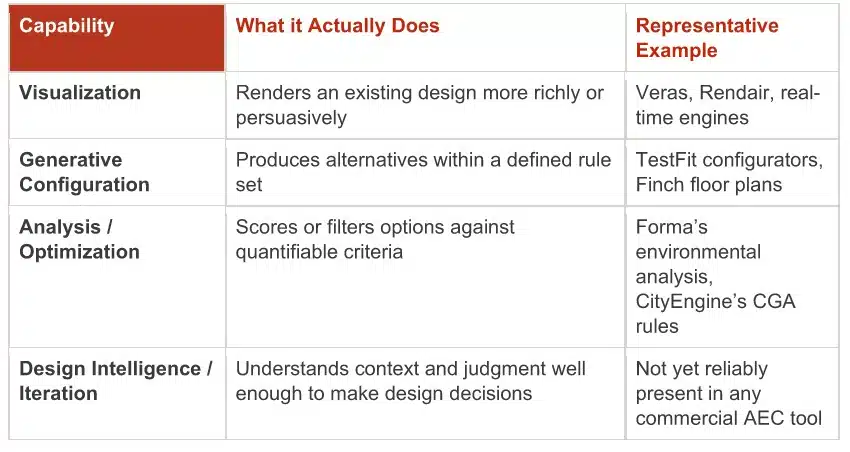 Today’s AI is genuinely excellent at the first row and steadily improving at the third. It isn’t doing the fourth—and firms that judge a visualization tool against the standard of design intelligence will be disappointed, not because the tool failed, but because it was never built for that job.
It’s also worth resisting the reflex to treat ‘generative’ as synonymous with ‘AI.’ Parametric and rule-based systems—Grasshopper definitions, Dynamo scripts, CityEngine’s CGA rules—can generate sophisticated design alternatives without any machine learning at all, producing output algorithmically from rules and inputs.
That’s a meaningfully different technology from a model trained on millions of images to predict plausible pixels, with different failure modes and different dependence on training data. Knowing which one a firm is actually adopting changes what it should reasonably expect from it.
The Right Tool for the Right Problem for the Right Phase
ArcGIS CityEngine, Autodesk Forma, and TestFit are routinely grouped together as ‘generative planning tools’—all three produce building massing from rules and site data. But grouping them obscures more than it reveals. Each solves a different problem, at a different phase, at a different scale.
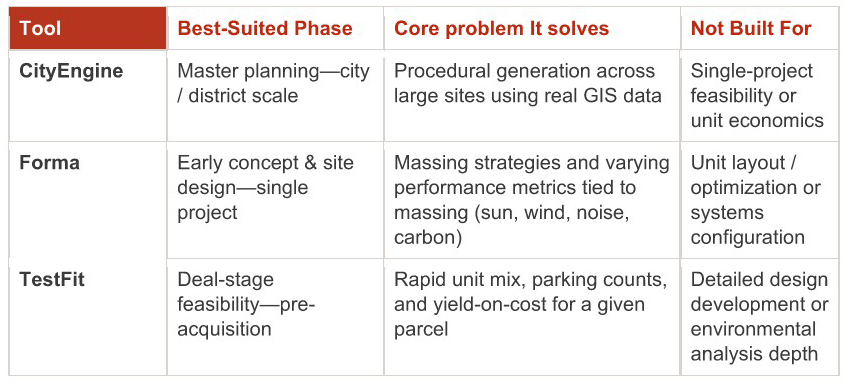 The point isn’t that one of these three “wins.” The right question is never “which generative planning tool should we adopt?” It’s “for what problem and which phase should we be considering?” A developer weighing a land acquisition and a design team refining massing on an entitled site are solving different problems on different timelines—even if both open a tool that draws boxes on a map. Skipping straight to a bake-off, without first locating the problem and phase, means scoring tools against criteria that were never relevant — a trap MV+A’s own 2024 review of generative planning applications ran into before we learned to ask what stage of work each tool was built for.
AI Beyond the Desktop: Workflow and Project Productivity
Most of the AI conversation in A/E is focused on design and visualization — but much of the realistic near-term value sits somewhere less glamorous: specification writing, construction-document review, RFI drafting, meeting notes, and general office production.
These are language and document tasks, not geometry tasks, and call for the same discipline — against a different set of capabilities and a very different stakes profile.
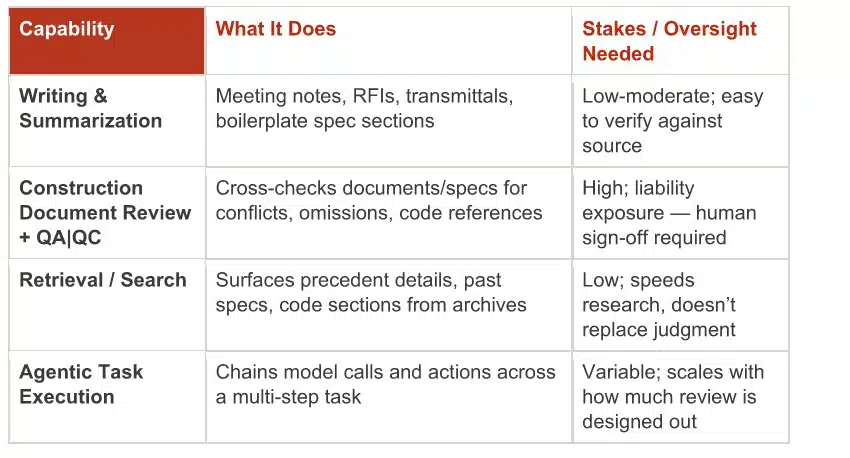 ‘Agentic’ is often discussed as its own tool category, but it’s better understood as a mode layered on the same stack from the first section above—a model, operating through an application, chaining decisions and actions with reduced human review between steps. An agent that reads CDs, flags spec conflicts, and drafts an RFI unsupervised is doing meaningfully more than a chatbot answering one question at a time—and the more steps it completes unsupervised, the more a firm needs to know where the model’s reliability holds up before removing a checkpoint.
General-purpose office assistants—Copilot and Gemini in Microsoft 365 and Google Workspace, transcription and scheduling tools—sit at the low-stakes, high-volume end of this spectrum, worth adopting broadly precisely because a wrong meeting summary is cheap to catch and fix. That asymmetry is itself a diligence signal: it should set how much human-in-the-loop review a use case actually warrants, independent of how impressive the underlying model is.
Evaluate the Ecosystem, Not Just the Tool
Once a tool is correctly classified and matched to a real problem and phase, the harder work starts: evaluating it as a fit for the firm, not just as a product on its own terms. Six factors belong in that evaluation.
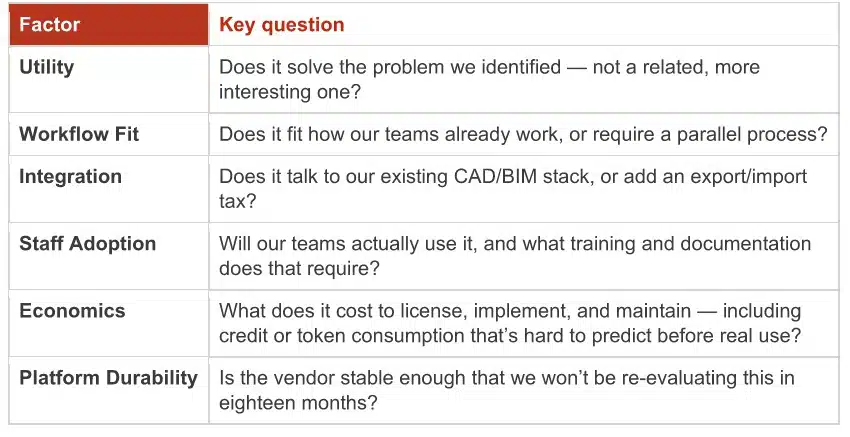 These factors interact in ways a feature list can’t show. Autodesk Forma may already be included in a firm’s A/E Collection seats, changing its economics compared with a similarly capable independent platform requiring a new contract and vendor relationship. Two tools with comparable utility can carry very different adoption costs once integration and training are priced in.
Platform durability deserves scrutiny, since “AI-enabled” spans everything from Alphabet-backed products, with a fairly low discontinuation risk, to single-founder startups launched within the past year. Neither extreme is disqualifying—but risk profile should be a named factor, not an afterthought discovered when a favorite trial goes unmaintained—see Google Delve; RIP Sidewalk Labs.
Two friction points recur often enough to flag on their own: 1) Credit- or token-based pricing—common across AI-native tools—trades the predictability of a per-seat license for a metering system where the real cost of a render or a generation isn’t obvious until the invoice arrives; it has to be budgeted from actual usage, not the price page. 2) Trial periods and learning resources are just as often mismatched to how firms evaluate software: MV+A’s 2024 review found thirty-day trials too short to reach a real verdict, and found comparable gaps in vendor tutorials across every application reviewed. Neither issue disqualifies a tool on its own, but both belong on the checklist—not discovered mid-pilot.
Adopt [AI] Workflows
The goal should never be to find a place to ‘add AI.’ It is to find where an existing practice is genuinely limited, then ask whether an emerging technology closes that gap better than the workaround in place—a question only testing on a real project can answer.
Running that sequence honestly requires holding three kinds of maturity apart, since a tool can score high on one and low on another:
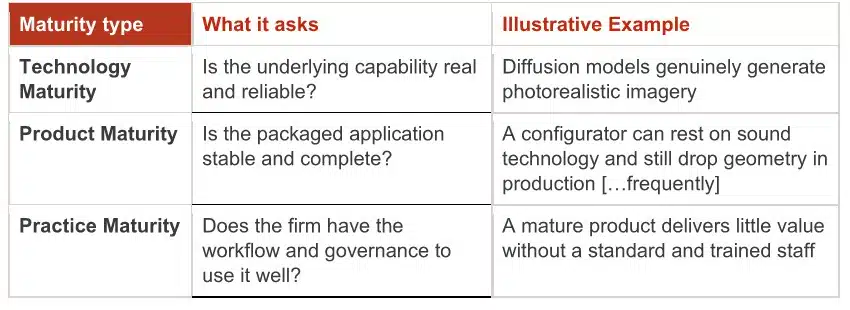 A powerful technology can still ship in an immature product. A mature product can still sit unused at a firm that hasn’t built the practice around it. Evaluating only the technology—the layer that gets the most hype—misses the layers that actually determine whether adoption succeeds.
The Take-Aways
None of this argues for caution over adoption—it argues for sequencing, and it applies as much to a spec-review agent as to a rendering plugin. Firms that get real value from AI won’t be the ones that adopted first or evaluated the most tools; they’ll be the ones that classified correctly, matched capability to problem and phase, and tested before committing.
-
AI is a stack, not a single product—know which layer you’re evaluating.
-
Generative doesn’t mean AI, and AI visualization doesn’t mean AI design.
-
The right question is never “which AI tool is best”—it’s “what problem, which phase, and which tool?”
-
Oversight should scale with the stakes of the output, not the sophistication of the tool.
-
Adopt workflows that happen to use AI—not AI in search of a workflow.